
Building a Rules-Based AR Queue Management System for Healthcare RCM
Accounts receivable across financial class, dollar value, and age had no rules-based prioritization layer, and no audit trail. Ideas2IT built a configurable, multi-tenant queuing system that assigns, tracks, and audits every account action.

Client
A national RCM and HIM consulting firm

Industry
Healthcare

Service
App Development
App Modernization

Engagement
Dedicated FDE model

Location
Peachtree Corners, Georgia
01 Challenge
The client's Extended Business Office ran hospital AR on a cash-methodology-driven strategy, but nothing enforced it. Accounts were triaged manually, with no rules-based queueing, no audit trail, and no visibility into how work was distributed across users.
02 Solution
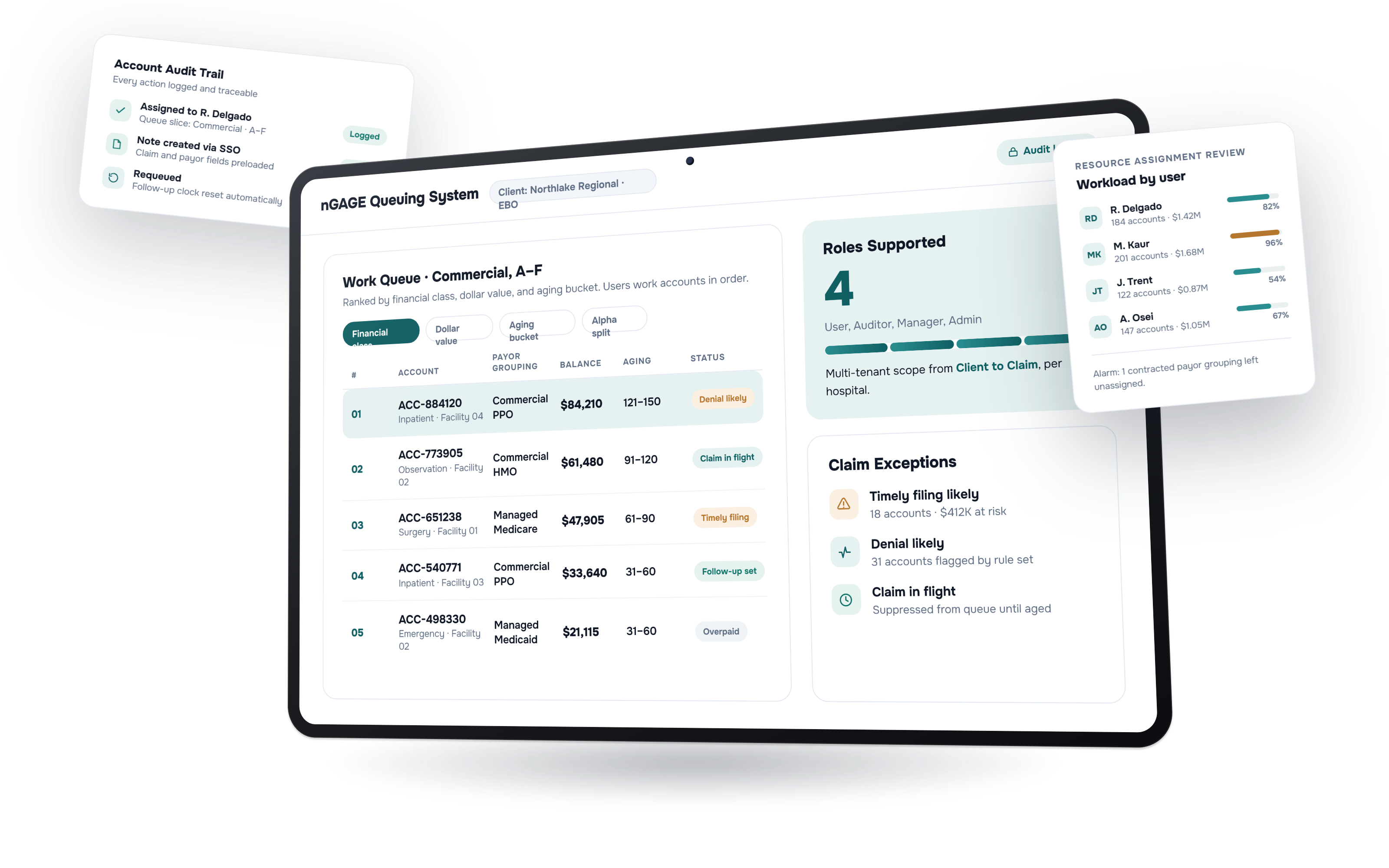
Ideas2IT built nGAGE Queuing System (nQ) as a prioritization layer on top of the EBO's existing productivity tool, not a replacement. A multi-tenant model scoped every client, payor grouping, and follow-up rule per hospital. Queues ranked accounts by financial class, dollar value, and aging, with notes created inside the existing tool via SSO deep-link.
03 Outcome
Highest-impact accounts surface first without manual triage. Every assignment, note, and requeue is logged. Admins configure clients, payors, and follow-up rules without code changes. Managers see workload distribution through live monitors.
Phase 01
Building an entity model where every client's rules stay separate
Multi-Tenant Data Foundation: Scoping Every Hospital Client's AR Rules Independently
The first architectural decision was scope: the client's EBO serves many hospital clients, each with its own payors, follow-up policies, and AR strategy, so nQ had to be multi-tenant at every layer, not just at login.
Ideas2IT built an entity hierarchy running from Client down through Facility, Account, and Claim, with Payor Master, Payor Grouping, and Aging Bucket Policy scoped per client rather than global. Aged Trial Balance, denial, and productivity data ingested from the EBO's existing systems fed this model, so every downstream queue rule and follow-up configuration applied to one client's accounts without affecting another's.
This Phase Produced
- Multi-tenant Client-to-Claim entity hierarchy
- ATB ingestion pipeline
- Denial and productivity data integration
- Payor Master and Payor Grouping model
- Per-client aging bucket and follow-up configuration
Phase 02
Turning manual AR triage into queues users work in order
Rules-Based Queue Engine: Prioritizing Accounts by Financial Class, Dollar Value, and Age
With the data model in place, Ideas2IT built the queue engine that turns configured rules into daily work assignments. Queue Definitions break into Queue Slices and Work Items, prioritized in Phase I by financial class, dollar value, and aging bucket, with users assigned to queues by client, financial class, alpha split, and dollar grouping.
Rather than build a second note-taking interface, Ideas2IT kept users inside the EBO's existing productivity tool: creating a note launches an SSO deep-link with claim, encounter, payor, and follow-up fields preloaded, and requeuing an account generates a system note and resets its follow-up clock automatically.
This Phase Produced
- Queue Definition, Queue Slice, and Work Item model
- Financial Class x Dollar Value x Aging prioritization logic
- User-to-queue assignment by client and financial class
- SSO deep-link note creation
- Automated requeue and follow-up reset
Phase 03
Replacing end-of-period reporting with live workload monitors
Monitoring and Administrative Control: Giving Managers Real-Time Load Visibility
The final layer gave managers and admins control without engineering dependency. Admins configure clients, mark payor groupings active or inactive, and build custom alarm queues by dollar or account threshold, all without a code change. Email alarms flag contracted payors left unassigned and thresholds exceeded.
A Resource Assignment Review Monitor shows account counts and dollar value by user for load balancing, and a Claim Exceptions Monitor surfaces categories including claim in flight, denial likely, overpaid, and timely filing likely. Every assignment, note, and requeue writes to an audit log, so any action taken on an account is traceable after the fact.
This Phase Produced
- Client and payor administration console
- Configurable email alarm rules
- Resource Assignment Review Monitor
- Claim Exceptions Monitor
- Full action-level audit logging
The Outcome
From Manual Triage to a Configurable, Auditable AR Prioritization System
The outcome traces back to one decision: building nQ as a prioritization layer on top of the EBO's existing tools rather than a replacement for them. That kept users inside their existing workflow while giving managers and admins the rules, visibility, and audit trail the cash-methodology-driven strategy always needed but never had running underneath it.